Category: Games

Multiplicative Skill

As I’ve mentioned before, I like watching Warcraft III replays. I also like observing games on Battle.Net. But I don’t play on BNet. Why?

Well, because I suck, and I get tired of being called a n00b. It’s hard to become a good Warcraft III player.

Why?

From what I can tell, there are four main skills you need to be a good Warcraft III player. They are:

* Build order
* Base layout
* Hero and unit selection
* Micromanagement of units

But you can’t just be really good at one thing and expect to win.

If you don’t have a good build order, you lose because the other player will gain resources and get their units out faster than you.

If you don’t have a good base layout, you lose because the other player can easily destroy your vital buildings.

If you don’t choose your heroes and units well, you lose because the other player will have abilities you can’t defend against.

And if you do everything else well but can’t perform the most basic hero-killing tricks like the surround, you’ll lose to opponents who can, all other things being equal.

Thus, if we could somehow rate players in these four areas on a scale of one to ten, a player’s final “skill score” wouldn’t just be his four ratings added together. They would be multiplied against each other, so that a single low score can properly drag the whole rating down into the gutter. And if one score is zero, the whole rating becomes zero.

Games need not be real-time to have multiplicative skills. Galactic Civilizations II is the same way. You need to be very good at researching in the right order, designing ships, setting up your planets properly and engaging in combat to have any hope of defeating the AI. Or you could just turn the AI down to “Fool”, at which point you’ll have to listen to stuff like this.

I used to love games that had multiplicative skills, but I don’t tend to play very many of them any more, simply because they take too long to get good at. You can’t play them casually.

I need to keep this in mind for Star Revolution.

End of Oblivion

I ended up watching about four hours total of Gamespot’s Oblivion stream before I had to go to bed.

That was a fantastic idea, and I hope they do it again with other games. Watching someone play a game for an hour or two will tell you much more about whether or not you’re going to like it than a review.

Greg played for 12 hours straight, taking only a few short breaks. When he got to the twelve hour mark at 6 AM, he was actually willing to continue playing, but had to stop when the fire alarm went off! The maintenance crew was testing the alarm and had assumed that no one would be in the building at that time of day.

As for the game itself…it’s basically Morrowind on steroids with a lot of bugs and interface problems fixed, and there is nothing wrong with that. I like how bashing someone upside the head with a mace really looks like it hurts. Unfortunately I didn’t get to see anything in town, so I still don’t know how effective the much-touted Radiant AI is. Plot looks interesting, but not really exceptional. Horses were extremely difficult to control, but the “travel anywhere” feature makes them pretty much irrelevant anyway.

I’m still completely stoked about the game and can’t wait to get my hands on my own copy. Collector’s Edition, with the making-of DVD, of course.


Day of Oblivion

Oblivion arrives today.

I don’t have the money to buy it.

Woe, woe is me.

So I’m going to do the next best thing, and watch a live feed of Greg Kasavin playing it for twelve hours straight.

This by itself is worth my yearly Gamespot subscription fee.


Oh, for crying out loud…

If Tycho loves Macs so much, I suggest that his next move should be to use one exclusively for a month. Pity about Galactic Civilizations II shipping…and Oblivion is coming out on the 20th…but surely the fantastic user experience of using a Mac will itself be sufficient to sustain him.


Oblivion

I’ve been obsessing over The Elder Scrolls IV: Oblivion pretty much since it was announced. The now-famous twenty-minute demonstration movie was as fine an example of geek porn as has ever been created. I figured the game would get pushed back; RPGs always do. Debugging a game that has a bunch of interacting subsystems takes a long time. So I wasn’t that disappointed.

One of the things I’ve done in the meantime is fire up The Elder Scrolls III: Morrowind again. Morrowind is a fine game hampered by a few flaws (and a lot of bugs, though the patches do help). Morrowind is also huge. While I don’t think it’s quite up to Baldur’s Gate II‘s two hundred hours of play, it’s quite big, and just working through the main quest can take dozens of hours. And of course there’s all that optional stuff to do.

So imagine my surprise when I saw on Speed Demos Archive a speedrun for Morrowind. The time was listed as 7:30. “Wow,” I thought to myself, “somebody beat Morrowind in seven and a half hours.”

No. Somebody beat Morrowind in seven and a half minutes – beat, in this case, meaning “getting the ending movie to the main plotline”. It’s an astounding movie, and I recommend watching it. Yes, it’s a bit spoilery, but it’s not too bad because you don’t get any context about why he’s doing what he does.

Even more interesting is the fact that the same page also lists the previous champion’s run, a 14:26 run. The runner who made this run took a completely different tack – basically, he went magic user while the first runner went warrior. The fact that the runs look completely different is a testament to the depth of the game. And deep is certainly what I’m looking for. I’m hoping Oblivion is excellent enough to balm the wound World of Warcraft inflicted on me when I hit level 60.

I’m also hoping my computer is good enough to run it!


Inaria Postmortem

Around the end of October 2005, I decided to try to write a complete computer role-playing game in forty hours. I was inspired by this article by Jay Barnson on GameDev.net, Jeff Vogel‘s excellent work, and by my own love of RPGs. I am a professional game developer, but I’d never written an RPG engine and considered that a “hole” in my experience.

I picked a time limit because I’ve also been fascinated by people being forced to do the best they can with their skills under such limits; this was one reason why I wrote my Iron Gamedev article (the other reason was that I was feeling really goofy that day). And of course competions like the Ludum Dare also inspired me.

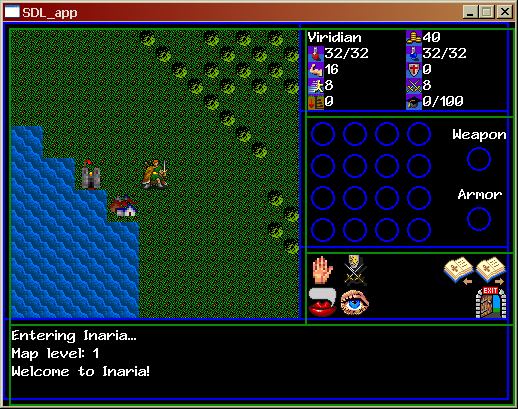
The project is now complete. You can download the game here, and the source files for both the game and the editor here. Here’s a screenshot:

Mmmm...pixels.

Now, the point of this project was to learn, not necessarily to make a complete and fun game. That said, I did want to make the game as good as it could be in the time I had. Here’s an excerpt from my original design doc with my goals:

We need four things to be able to call the project a success.

We need to create the map structure and populate it with an initial terrain layout.
We need to allow the player to walk around the map and be blocked by passability data.
We need to create monsters and have them move toward the player and attack him when they get in range.
We need to allow the player to attack back, and to have the player somehow gain in abilities when he succeeds in killing monsters.

That’s it. If we get that, we can publish it without fear of too much ridicule.

But that’s not enough. What I want is:

A map structure where every map cell is a list of critters placed on that cell. When the cell is drawn, all objects in that cell are drawn, from bottom to top. Since the terrain object will be pushed on the map on load, it will always be drawn first, on the bottom.

A map structure that contains data for map links.

An inventory and a current equipment screen.

If we get all this implemented, I will consider the experiment a resounding success.

Finally, what I’d really like is:

An overworld, three towns, two castles, and eight dungeon maps.

An overall plot, no matter how thin.

Quests and quest objects.

If we get all this implemented, I’ll be damn suprised.

Well, I didn’t get quite everything on my list done, but I’m still very surprised at how much I accomplished. I got the map structure I wanted, an inventory, buying and selling, NPCs with different AI behaviors, levelling up, one town, two castles and eight dungeons. And a very, very thin plot, but not quests or quest items.

I kept rigorous track of my time, but since I have a full-time job and a family, I wasn’t able to spend my hours over the course of a weekend or even a week or two. It took me about three months to finish the project, and I actually feel I did well completing it in that time. I am actually alloting myself four months to complete my next forty-hour project.

I would break down my time spent as follows: about five hours was spent fiddling with graphics, about thirty hours was spent writing code, and about five hours was spent creating the NPC data files and game levels.

What Went Right

Kicking it Old-School

Emulating an old Ultima-style RPG was the right tack to take. If I’d tried to write a 3D RPG, I simply would have gotten overwhelmed and probably quit. The feature set I wanted fell into the “tough but doable” range and made for a perfect forty-hour challenge.

Using the SDL

I wouldn’t have completed what I did if I had not used the SDL and instead just used DirectDraw. End of story. I cannot imagine why someone would not want to use it for a project like this, it was so easy to use and saved me so much time.

Grabbing Graphics off the Web

All the items, monsters and NPCs in the game came from this page of free RPG tiles. This was a lifesaver – if I’d had to create the graphics myself, not only would they have looked like crap, I would have burned so much time on them that I would not have had any chance of completing my goal. As it was, I could not find any decent terrain tiles that I liked, so I ended up grabbing a lot of the ones I used out of Ultima VI. This cost me at least two hours, unfortunately.

Making an Editor

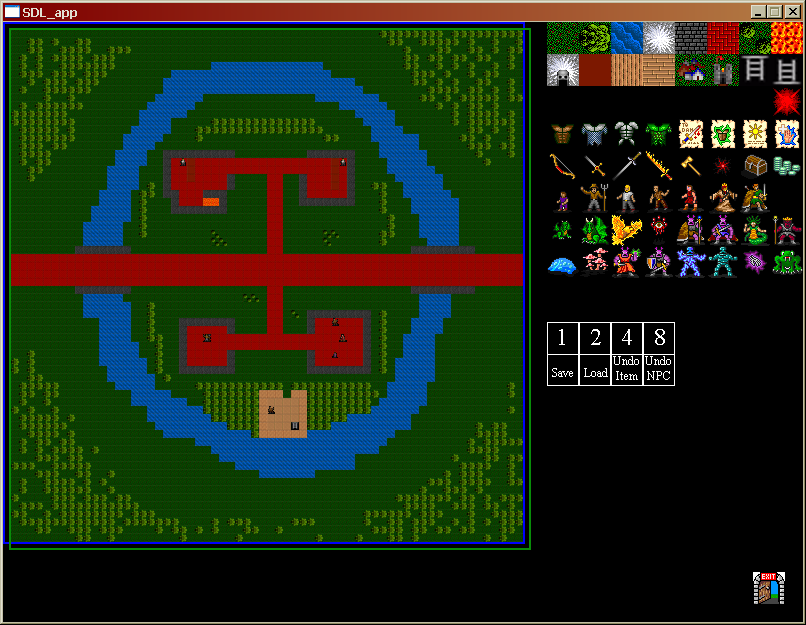
I spent about five hours making an editor for the engine – you can see a screenshot of it here and it’s included with the source package linked above. I think this may have been my smartest move. I ended up spending far too much time on the code and far too little on the maps (see What Went Wrong, below), but if I hadn’t had the editor I probably wouldn’t have gotten more than one or two maps into the game.

Using my PDA to Sync Projects

I have an Asus A620 PocketPC-based PDA. I love it, and one of the things I use it for is to keep projects synched between work and home. This way I was able to work on my project at work, sync my PDA, take it home, sync it at home, and pick right up where I left off. Now that I’ve got some webspace, though, I’ll probably set up a Subversion server to make it even easier, and give me real source control features like versioning.

Blogging the Process

This was vital. The fact that I knew people were watching kept me going when I got really tired of the project 🙂 I’d like to thank my friends Ryan Clark and Tom Mauer from work who tracked the progress of the project with interest, as well as Andrew Wooldridge and Gianfranco Berardi who linked to me, and to Sol who piped up with helpful suggestions when I mentioned I was using his tutorials.

What Went Wrong

Hoo boy, where to start?

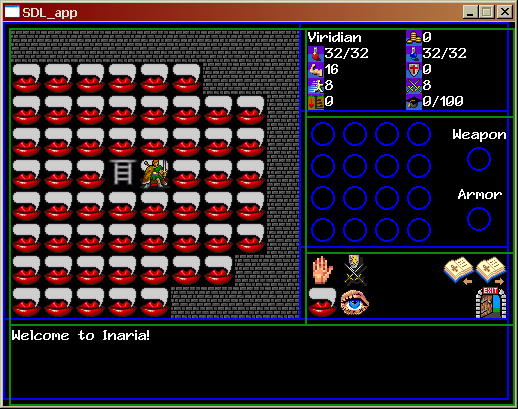
Well, first, here’s a screenshot of the most visually interesting bug I encountered during development:

I'm walking on mouths.

Multiple Mistakes with the Editor

I made two huge mistakes with the editor. First off, I made it too early in the project. I made the editor when I felt I needed map data to work on, but once I had the map I then added lots of features to the map structure…which the editor then didn’t support. I had to add the map level number, map name and map links all by hand. The editor still saved me time, but it could have been even better if I’d just made a temp map by hand to work on, finalized my map data structure, and then made the editor.

My second mistake was a doozy. I split the editor off into its own project, instead of simply creating a new editor source file in the base project. By splitting the editor off, I ensured that all maps would have to be moved from the editor folder to the actual game folder before they could be tested – and then moved back if additional work was needed. Maps quickly got out of date and filenames got confused. I finally fixed this by putting a hardcoded path into the editor source so that it saved and loaded from the game folder, a terribly hacky solution.

Secondly, I ensured that all the changes to the source files I made while writing the editor had to be merged back over to the game project, and then changes made there had to be merged back into the editor…it was just bad. Still much better than no editor at all, but these mistakes caused me to eat up time that could have been spent making the maps better. Which leads me to…

Too Much Time on Infrastructure, Not Enough on Content

Now…this is a thing that went wrong, but in the end, this was a learning exercise, not an attempt to make a publishable game. I wanted the game to be as good as it could be, but in the end the quality of the game is not that important.

That said, the game could have been twice as good with just one or two more hours spent on the content – and I’d have had those hours if I’d both planned better and not made those boneheaded mistakes with the editor. There are features in the engine that the player will never see…because I didn’t have time to write content that uses them. Yay!

Schizophrenic Source Code

I almost didn’t want to post the source…in just about every case, I started doing things the “right” OOP-ish way, and then reverted to procedural programming when time got tight.

For instance, there is an NPC class. Great! Do I subclass from that for all my NPC types so that I can program in individual unique NPC actions? Nope, I simply use that one class and have the Update() function determine the NPC’s type and perform actions based on a classically bad switch/case statement. The input code is atrocious; I’m doing tons of stuff there that have nothing to do with input. I felt like crying when I put the code to draw the hit marker and projectile marker inside the input function with their own frame pumps…but it was either do that or cut them completely. I guess I can console myself with at least knowing that it was bad.

Conclusion

Despite all of that, I do consider the project a success. I learned a lot and created a fair amount of code that can and will be reused for other projects. And I’m planning on doing three more of these forty-hour learning exercises over the course of the next year.


Pencils Down

It’s finished!

Woohoo!

You can download a version to play here. A full postmortem is forthcoming…after I recuperate a bit 🙂

Here’s the readme file:

Inaria Readme File

This is a role-playing game I wrote from scratch in forty hours over the course of three months. To read more about the game’s development, please visit my weblog at https://viridiangames.com/blog !

BASIC CONTROLS

Inaria can be played with the keyboard and the mouse, or the mouse alone (sorry, there is no way to play it just with the keyboard).

You can move your character by pressing the arrow keys, using the WASD cluster, or left-clicking on the map where you want your character to go.

You can pick up items in the world by left-clicking on them. They will appear in your inventory. Left-clicking chests opens them, revealing their contents.

You can use items in your inventory by left-clicking on them. Left-clicking arms and armor equips them and gives you stat bonuses. Left-clicking potions drinks them.

The GUI pane in the bottom-right, right above the text area, is your main interface with the game. The four buttons on the left allow you to talk to, look at, pick up or attack anything or anyone in the game. The four buttons to the right of those are your spell buttons (although initially you don’t have any spells). The three buttons on the far right allow you to load, save and quit the game. All of these buttons work by left-clicking.

This game also uses smart right-clicking. Right-clicking an enemy automatically attempts to attack that enemy. Right-clicking a friendly NPC talks to that NPC.

OPTIONS

You can change the game to run fullscreen by opening the engine.cfg file and changing the line

full_screen = 0

to

full_screen = 1

I wouldn’t recommend playing around with any of the other options…they could very easily lead to crashes.

GAME TIPS

You start off with a little money, just outside a town. Run inside and visit the merchant. Buy a dagger and some leather armor; this will make you a bit more effective in combat.

When you find a dungeon entrance and go inside, look at the text displayed in the text area. This will tell you the name of the dungeon and its level. If the dungeon is significantly higher than your level, it’s probably a good idea to leave it and come back to it later.

Try talking to monsters!

The Clever Merchant in town is the only place where you can buy potions. If you’re having trouble finding them, sell all the weapons and armor you’re not using and use that money to buy more.

When you level up, clicking the muscle symbol increases your attack power, making you more likely to hit. Do NOT level up your speed, that statistic isn’t used in the game (sigh).

The game honestly is not well-balanced. I just didn’t have the time. As a result, it’s not that hard a game. If you play smart, you should beat it pretty quickly.


Quake 4

I just played the Quake 4 single player demo.

If this were an SAT test, you could sum up Quake 4 as

Quake 4 : Quake 2 :: Doom 3 : Doom 2

Basically, Quake 4 is Quake 2 prettified and given a new situation. You’ll even fight some of the same enemies from Quake 2 early on in 4.

This makes me sad, because the original Quake remains my favorite in the Quake series. I enjoyed the fact that the game jumped back and forth between military installations and gothic castles – it felt like you were jumping between two realities, ours and another that was attempting to take over. I am aware that this was because the Id guys never really finalized a design for the game, but I still liked it. I’d like to see a more direct sequel to the original Quake, perhaps with a feature where levels morph from realistic to fantastic and back while the player is running through them.


Proto-Survival Horror

Update: Okay, okay! Good grief! Who knew Clock Tower fans were so rabid? It turns out that the original Clock Tower was not made or published by Capcom, but by Human Entertainment. When Human went out of business Capcom bought the Clock Tower series. Capcom then handed the series to Sunsoft, who made Clock Tower 3.

While I was incorrect about the heritage of the Clock Tower games, I don’t think it invalidates my point, especially since Sweet Home was created by Capcom.

Original post follows.

Digging through the history of video games can lead to some interesting places (most of them in Japan, of course). For instance, did you know that Capcom was experimenting with the horror genre long before Resident Evil?

I was looking through some reviews at Gamespot for Indigo Prophecy when I noticed that one of them mentioned a game called Clock Tower. I looked up the reviews for the Clock Tower games and saw that they were a series of horror games from Capcom for the PlayStation. Interesting enough.

Then, to my surprise, I googled “Clock Tower” and discovered that the original Clock Tower game was for the Super Nintendo, and the PlayStation Clock Tower game was actually a sequel to the SNES game! I finally was able to track down a ROM of the SNES Clock Tower that was fan-translated.

SNES Clock Tower is a very interesting game. In Clock Tower, you play a fourteen-year-old orphan girl named Jennifer Simpson, who has just been brought along with three other girls to live with the reclusive, eccentric Mr. Barrows. Upon arriving at the Barrows mansion, their ward, Miss Mary, goes to find Mr. Barrows. After a while, Jennifer goes to look for Miss Mary. As soon as she leaves the foyer she hears screams, and returns to find all of her friends gone. The player must now discover how to escape from the mansion.

It’s effectively a B-grade horror movie, and the game is effectively an adventure game, rather than a fast-action game. You move a pointer around the screen with your controller, and press the button to have Jennifer move there or interact with that object. It feels like a natural for mouse control (and a PC version was eventually made), and the stilted control system did put some people off the game.

But there were a couple of interesting things about the game. The first is that you will not kill anyone. Ever. No, you will not get a shotgun. No, nor a pistol. Or even a knife. While the villains will die during the course of the story if you make the right decisions, if someone is chasing you you have no choice but to run and try to hide or get away.

The other interesting thing is how the game tracks your damage. It doesn’t actually track Jennifer’s health, but rather her fear and sanity level. If the background behind her portrait is blue, she’s fine. If it’s green, she’s a little freaked out. If it’s yellow, she’s about to panic, and if it’s red, she’s in full-blown panic mode. When you are attacked, you can press the “panic” button on the controller rapidly to temporarily fend off your attacker, but this increases your panic level, as does hearing creepy sounds or running around if Jennifer isn’t being pursued. And if your level was red when you were attacked, then you’re doomed – Jennifer is so freaked out she can’t even defend herself.

Also, if Jennifer is being pursued, she can often do things she couldn’t otherwise do; for instance, if she’s being pursued you can hit the panic button to have her climb over a book case to get away from an enemy – but you can’t do this normally. Thus, in some cases you may actually have to find an enemy and have them chase you in order to be able to get to certain areas.

Is it survival horror? Not exactly, but it is a very interesting take on the horror genre, and I had no idea Capcom had made the game until just a few days ago. What’s even more interesting is that reading websites about Clock Tower brought up several mentions of another game called Sweet Home. What is Sweet Home? Why, it’s a horror game for the NES, of course. And get this – it’s a horror RPG for the NES.

Sweet Home tracks the adventures of five young artists who travel to an older artist’s manor to look for him, since he hasn’t been heard from in over a year. Once they arrive at the mansion, their retreat is cut off and they have no choice but to fight their way through the mansion, learn its secrets, and finally put an end to its evil.

So how do you do a horror RPG? Easy – make the game hella tough, make death permanent, and give the players as few healing resources as possible. The mansion holds a total of 21 healing salves – use them all up and they are gone and there is no way to get any more, ever. If one of your characters dies, then they are dead and they cannot be revived. Then add a truly creepy setting and plotline and you’ve got a horror RPG. One interesting element is that the game does not feed you the storyline. You figure out what happened by looking at the artwork that inhabits the mansion, as well as by reading the journal entries of previous adventurers who became trapped in the mansion and didn’t make it out. This “piecing together of the plot” mechanic works wonderfully for horror games, and was later used to great effect in both of the System Shock games.

So now you know – Capcom was into horror long before the RE series, creating horror games since the late eighties!


All things…

All things come to he who waits.